Use AI Without Risking Your Data
Ask questions about contracts, cases, and documents — with zero risk of data leaks. Works offline, stays on your computer.
Trusted by 200+ law firms, government agencies, and compliance teams.
Encryption
Bank-Level
Access Control
Password + Biometric
Where Data Lives
Your Computer Only
External Connections
Zero
Compliance Ready
No client data ever leaves your device
See It in Action
A familiar chat interface. Powerful AI reasoning. Complete privacy.
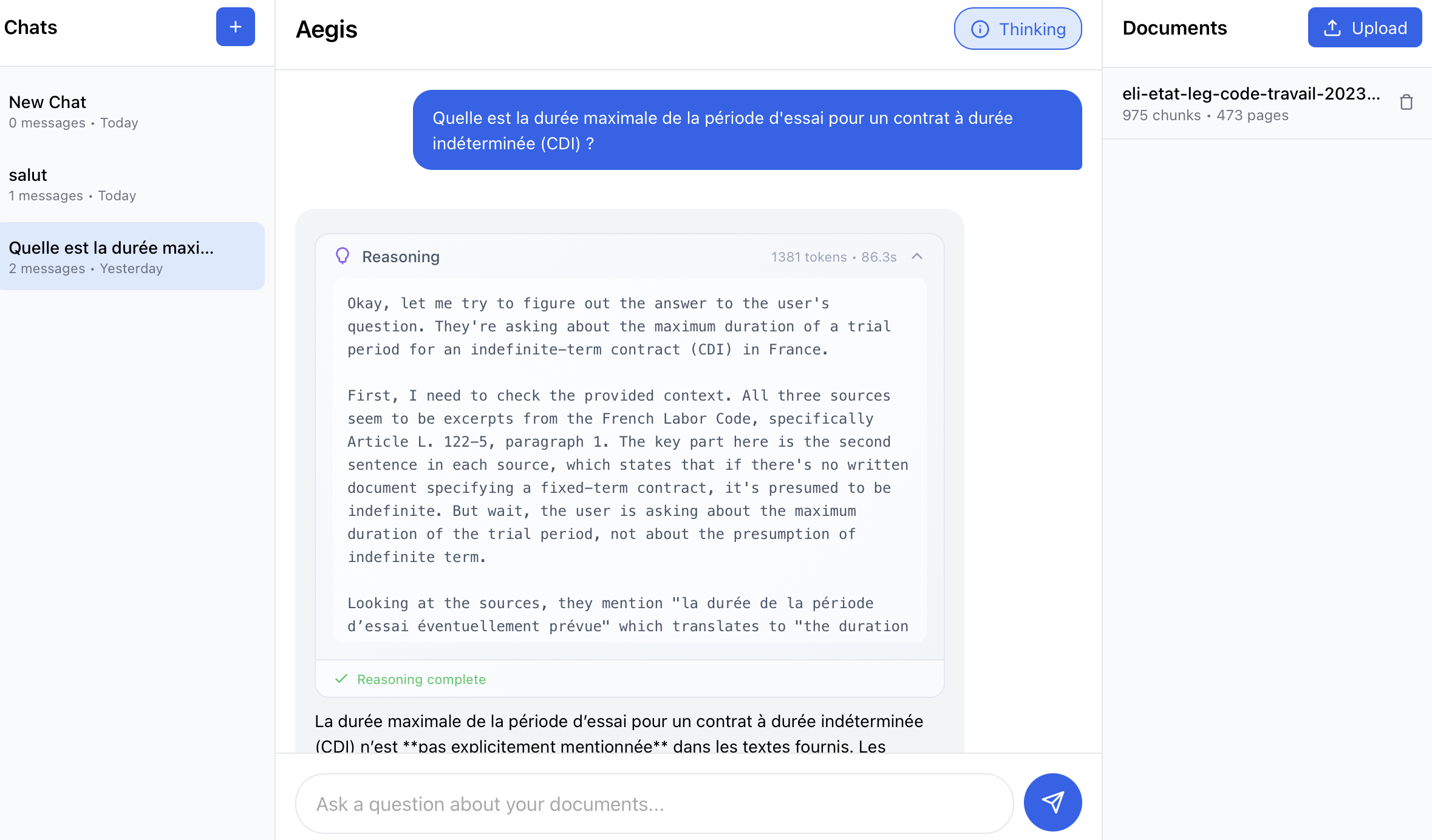
Ask questions about your documents and get accurate answers with source citations
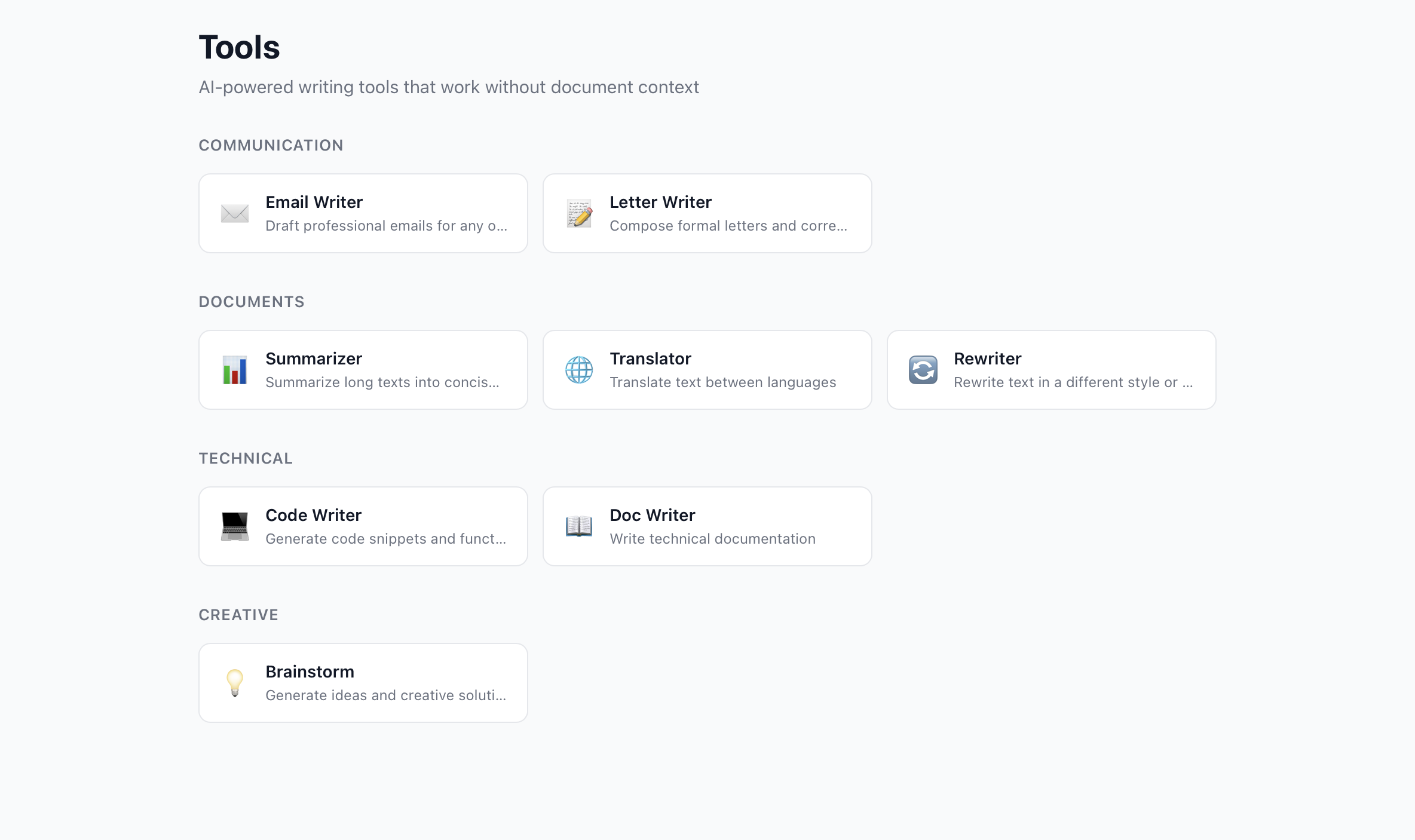
Write emails, letters, and summaries

Organize work with custom Agents
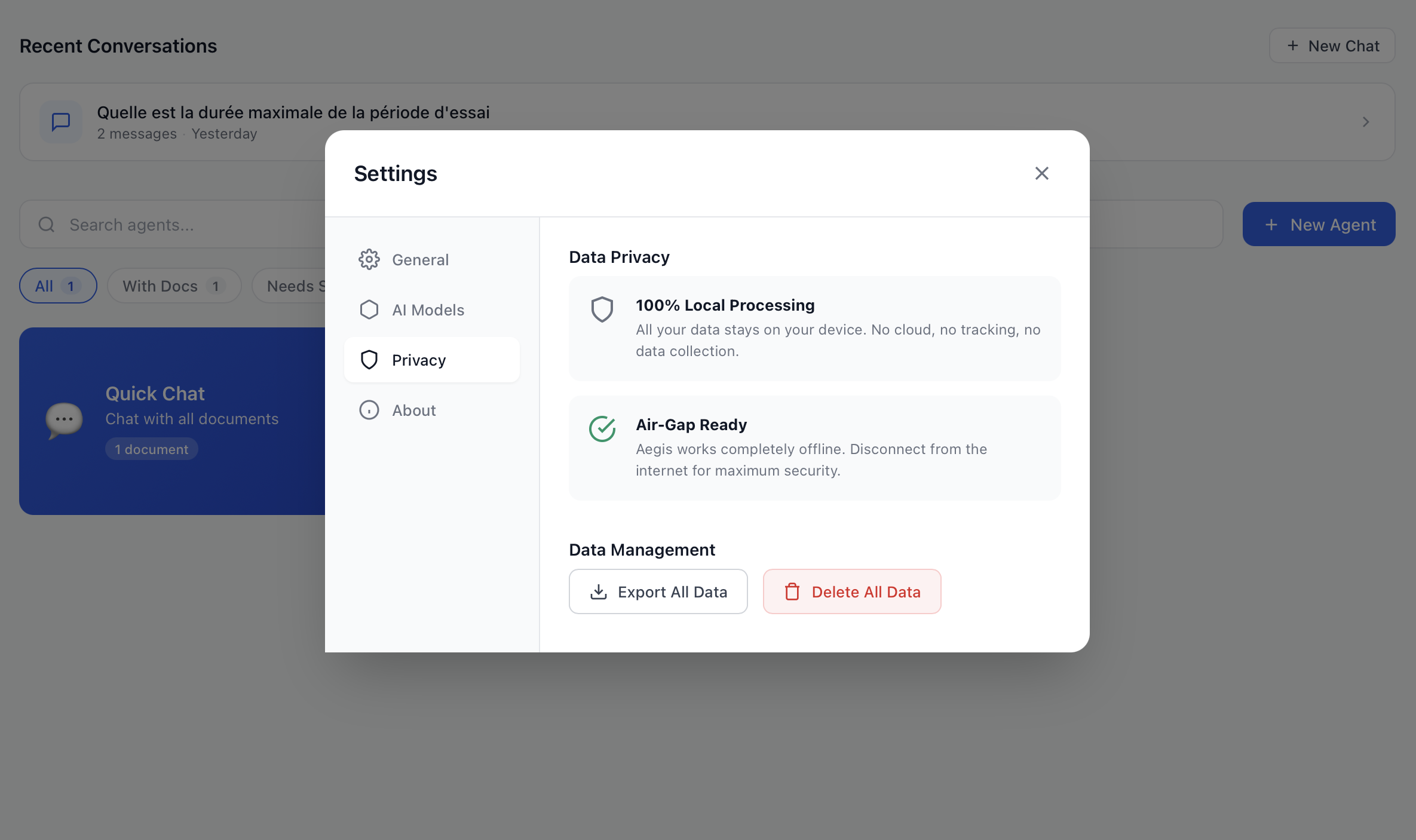
100% local — your data never leaves
Built for Professionals Who Can't Risk Data Leaks
Join teams who chose privacy without sacrificing productivity.
Law Firms & Legal Teams
Cloud AI violates attorney-client privilege
Analyze contracts, research case law, draft briefs — all offline. Your client data never leaves your machine.
Government & Public Sector
Classified documents can't touch the cloud
Air-gapped deployment for sensitive government operations. No internet connection required.
Finance & Compliance
Regulatory audits require data control
Process financial reports, contracts, and client data with full audit trail. SOC 2 ready.
Healthcare & Research
Regulations prohibit cloud data processing
Analyze medical records, research papers, and patient data in complete privacy. HIPAA & GDPR ready.
Why Professionals Choose Vult
Cloud AI tools put your confidential data at risk. Vult keeps everything local.
When you use cloud AI with client documents, that data may be stored, used for training, or accessed by third parties.
"Cloud-based AI tools do not offer legal privilege or confidentiality protection." — American Bar Association, 2024
More Than Document Q&A
AI-powered writing tools that work without uploading any files. Draft emails, translate text, or brainstorm ideas — all 100% private.
Communication
Email Writer
Draft professional emails for any occasion
Letter Writer
Compose formal letters and correspondence
Documents
Summarizer
Summarize long texts into concise overviews
Translator
Translate text between languages
Rewriter
Rewrite text in a different style or tone
Technical
Code Writer
Generate code snippets and functions
Doc Writer
Write technical documentation
Creative
Brainstorm
Generate ideas and creative solutions
Finally, AI You Can Actually Use at Work
Stop choosing between productivity and confidentiality. Get both.
No Internet, No Risk
Works completely offline. No data ever touches the cloud. Perfect for client-privileged information.
Get Answers in Seconds
"What's the termination clause in this contract?" Get instant, accurate answers from hundreds of pages.
Search Like You Think
Ask in plain language. Find that specific clause across 500 documents in under 3 seconds.
Your Data Stays Yours
Same encryption used by banks. Even if someone steals your laptop, your files are unreadable.
Pass Any Audit
GDPR, SOC 2, ISO 27001 ready. Show auditors exactly where your data lives: your computer only.
Verify, Don't Trust
Our code is public. Your IT team can inspect every line. No hidden data collection.
Built for professionals who handle sensitive information
3 sec
Search across 500+ documents
100%
Data stays on your device
0
Cloud connections
24/7
Works offline
Security Architecture
Four layers of protection for your sensitive documents.
Authentication
Argon2id password hashing with optional biometric unlock.
Encryption
SQLCipher database with AES-256 encryption.
Network Isolation
Air-gap enforcement with network detection alerts.
Audit Trail
Immutable audit logs with hash chain integrity.
One Price. No Surprises.
Pay once, own forever. No monthly fees. No per-seat charges that grow with your team.
Professional
For solo practitioners and consultants
+ €190/year optional updates & support
- Process unlimited documents
- Runs on your laptop or desktop
- Bank-grade encryption included
- Email support within 24 hours
- 12 months of free updates
Team
For firms that need to share documents securely
+ €190/user/year per team member
- Pre-configured secure server
- Unlimited document processing
- Add team members anytime
- 24/7 priority phone support
- We set it up at your office
- Staff training included
Frequently Asked Questions
Everything you need to know about using AI safely with your documents.
How does Vult protect my documents?
Vult runs entirely on your computer. Your documents never leave your machine. The AI runs locally, with no internet connection required. Everything is encrypted with AES-256.
Can I use Vult without internet?
Yes, Vult is designed to work 100% offline. Once installed, no internet connection is needed to analyze your documents or use the AI. This makes it perfect for air-gapped environments.
Is Vult GDPR compliant?
Yes, Vult is GDPR compliant by design. Since your data stays on your device and is never transmitted to external servers, there is no risk of personal data leakage or third-party processing.
How is Vult different from ChatGPT or Claude?
Unlike cloud-based AI assistants (ChatGPT, Claude, Gemini), Vult processes everything locally on your computer. Your documents and conversations are never sent to external servers, making it safe for confidential legal, financial, and medical documents. Cloud AI may store your data and use it for training.
How does Vult compare to PrivateGPT or LocalGPT?
While PrivateGPT and LocalGPT are developer-focused tools requiring technical setup, Vult is designed for non-technical professionals like lawyers and compliance teams. Vult offers a polished interface, built-in document management, and enterprise-grade encryption out of the box.
Can I use Vult for attorney-client privileged documents?
Yes. Since Vult never sends data to external servers, attorney-client privilege is preserved. The American Bar Association warns that cloud-based AI tools may compromise privilege — Vult eliminates this risk entirely.
What document formats does Vult support?
Vult supports PDF, Word (.docx), Excel (.xlsx), PowerPoint (.pptx), and plain text files. You can upload multiple documents and query them all at once.
What are the system requirements?
Vult runs on Windows 10+, macOS 12+, and Linux (Ubuntu 20.04+). It requires at least 8GB RAM and 10GB of free disk space. A modern CPU with AVX2 support is recommended for best performance.
Be First. Pay Less. Forever.
Join the founding 100 and lock in exclusive benefits for life.
Lifetime priority support
25% off your license
Direct input on features
contact@vult.chat
Send us an email to reserve your spot • Launching Q1 2025